Give Hermes tools from n8n
The Hermes tools workflow is the list of tools Hermes can call while you chat. Attach a Google Sheets tool, for example, and Hermes can look up rows when you ask. Hermes can use what you attach, but cannot change it.
Hermes tools work from the first boot, with no setup, and do not need the workflow builder.
What's there at the start
One example tool, a Calculator. Ask Hermes to work something out with the n8n calculator to see it in use:
Add a tool
- Open the Hermes tools workflow in the n8n editor.
- Attach a tool to the Tools for Hermes trigger. Any n8n tool node works, such as a Google Sheets or HTTP Request tool, or Call n8n Workflow Tool to hand Hermes one of your own workflows.
- Give the tool a clear name and description. Hermes reads them to decide when to use it.
- Save the workflow. Click the publish button in the top right of the page.
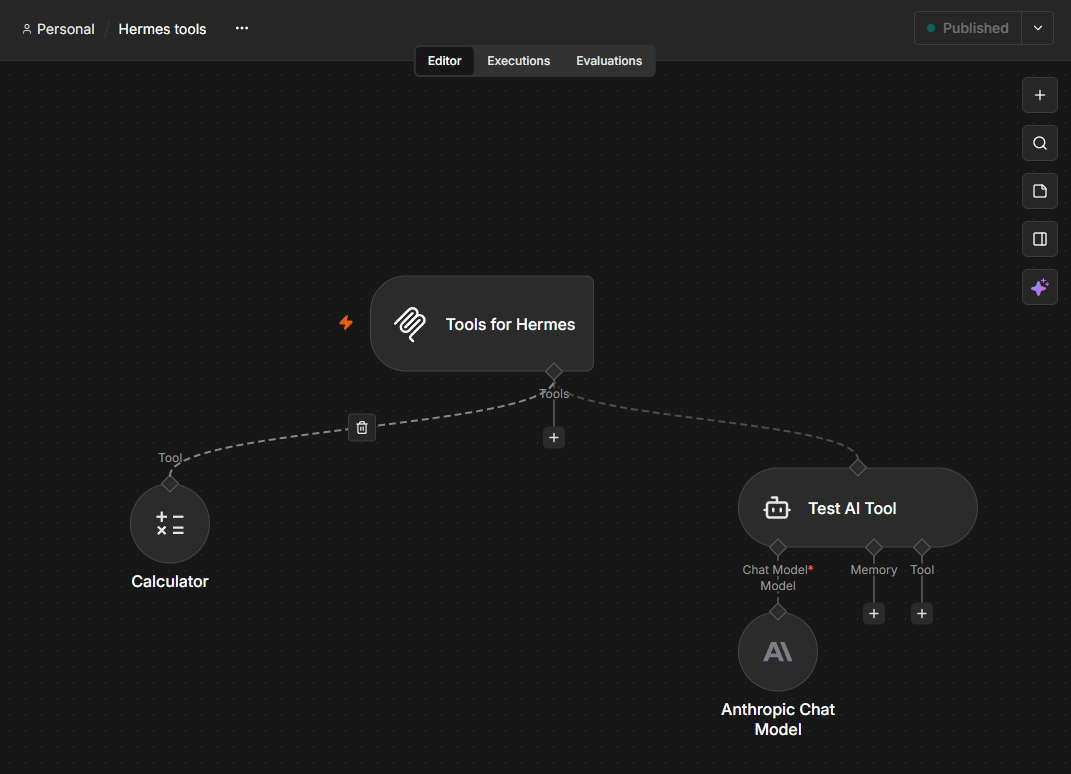
Hermes picks up the new tool the next time it connects. Restart its gateway to make that happen at once:
Use without editing
Handing Hermes one of your workflows through Call n8n Workflow Tool lets it run that workflow without being able to change it, even if mcp access for that tool is not enabled.
Keep it published
Hermes can reach the tools only while Hermes tools is published. If it is
unpublished, sudo hermes-n8n doctor offers to publish it again.
The Enable MCP access switch in n8n's Settings, Instance-level MCP does not affect Hermes tools. It controls the workflow builder only.
Last updated October 25, 2026 · Suggest an improvement